Mi ejÉrcito Krieg
de WH40K
Menu


Acerca de los Minis
Esquemas de Pinturas
Acerca de Warhammer
Como Jugar WH40K
Cajas Adquiridas
Siguientes Adquisiciones
Acerca de los minis y como inicia el vicio....
Después de que un hijo de perra que cree en el falso Omnissiah y rinde culto a la herejía del Adeptus Mechanicus (broma ingame) me vendiera al universo de Warhammer 40K, decidí optar por comenzar a adquirir las minifiguras. Antes de iniciarme en este vicio de figuritas de plástico hecho para acabar con los ahorros de tu vida, me resultaban fascinantes las miniaturas de los llamados "orkos", unos brutos verdes que sí que son divertidos de pintar y de usar. Sin embargo, después de estudiar detenidamente qué aesthetic me agrada más, he optado por aquellos que se ven mucho mejor y son más interesantes: los Cuerpos de la Muerte de Krieg. He de decir que me resultan aún más intrigantes debido a su estilo de soldado franchute de trinchera de la Primera Guerra Mundial. Aunque, si he de ser honesto, me recuerdan a otro tipo de soldados que reflejan más mis convicciones, lo cual los hace incluso más interesantes de ensamblar, pintar y eventualmente jugar. Porque sí, al final las piezas monguer que se presentan a continuación han resultado ser para un juego de mesa en donde básicamente gana el más embadurnado en dinero. Hay aún más facciones que cada uno puede investigar por su cuenta pero, como ya he dicho, al menos esta es la que más atractiva me resulta, puesto que luce austera y menos chetada que el resto de facciones para jugar, lo que lo hace más divertido todavía.

Acerca de Warhammer 40K....
Ahora bien, Warhammer 40,000 o WH40K, es el universo de ciencia ficción más exagerado, oscuro y macabro que se te pueda ocurrir, y luego multiplícalo por un millón.
Si tuviera que sentarme con alguien que no tiene ni puta idea de este vicio y explicárselo en un bar, se lo contaría de la siguiente manera:
La Premisa: No hay buenos, solo niveles de maldad
En la mayoría de las historias del espacio (como Star Wars o Star Trek), siempre hay un grupo de rebeldes buenos, una federación pacífica o la esperanza de que el universo sea un lugar mejor. En Warhammer 40K no existe la esperanza. El lema oficial del juego lo deja claro: "En el siniestro futuro del cuadragésimo primer milenio, solo hay guerra".
Nos situamos en el año 40,000. La galaxia es un lugar gigantesco, frío y aterrador donde conviven billones de seres vivientes, pero todos se odian a muerte. No hay diplomacia, no hay tratados de paz. Si dos facciones se cruzan, se matan. Punto.
Para entender cómo se sostiene este universo, hay que entender tres pilares fundamentales:
1. El Imperio de la Humanidad (Un imperio en decadencia)
La humanidad domina gran parte de la galaxia, pero no somos los "buenos de la película". Imagina una mezcla entre el Imperio Romano, la Santa Inquisición y una dictadura militar hiperreligiosa.
-
El Emperador Cadáver: Hace 10,000 años, un ser superpoderoso conocido como "El Emperador" unificó a la humanidad. Pero tras una traición brutal, quedó al borde de la muerte. Hoy en día, es un cadáver momificado pegado a una máquina gigante (el Trono Dorado). Está técnicamente vivo, pero atrapado en una agonía eterna.
-
La religión del miedo: Los humanos lo adoran como a un Dios absoluto. Si piensas diferente, la Inquisición te ejecuta por hereje.
-
El olvido tecnológico: La humanidad ya no entiende la ciencia. Si un tanque se rompe, el mecánico no lo repara con herramientas; le echa aceites sagrados, reza oraciones al "Espíritu de la Máquina" y le pega golpes esperando que funcione. La tecnología es tratada como magia.
2. La Disformidad: El Infierno Espacial
En este universo, viajar por el espacio no es tan fácil como darle a un botón de "hiperespacio". Para cruzar las estrellas rápidamente, las naves tienen que meterse en La Disformidad (el Warp).
La Disformidad es una dimensión paralela hecha de pura energía psíquica, pensamientos, emociones oscuras y pesadillas. Es, literalmente, el Infierno. Ahí dentro viven los cuatro Dioses del Caos (entidades monstruosas basadas en la guerra, las plagas, el exceso y el engaño) y sus legiones de demonios. Viajar por el espacio en Warhammer 40K es como cruzar el mismísimo infierno en un barco de madera rezando para que los demonios de las paredes no rompan las ventanas y se coman tu alma.
3. Las Amenazas Alienígenas (Xenos)
Por si tener demonios espaciales y un gobierno totalitario fuera poco, la galaxia está infestada de alienígenas peligrosos que quieren extinguir a los humanos. Tienes desde Terminators egipcios espaciales que odian la vida orgánica (Necrones), hasta insectos gigantescos que vienen de fuera de la galaxia para devorar planetas enteros como si fueran un buffet libre (Tiránidos), pasando por hooligans verdes que se reproducen por esporas y solo quieren darse de hostias (Orkos).
¿De qué va realmente Warhammer 40K como concepto?
Al final del día, Warhammer 40K va sobre la supervivencia extrema y la ironía trágica.
Es la historia de una humanidad que, con tal de no extinguirse contra monstruos espaciales y demonios, se convirtió a sí misma en el monstruo más grande de todos. Una galaxia donde la vida individual no vale absolutamente nada, donde se mandan a millones de soldados a morir a una trinchera en un planeta radiactivo (como mis Krieg) solo para ganar diez metros de terreno fanganoso, y donde cada día es peor que el anterior.
Es un universo trágico, pero tan absurdamente exagerado, gótico y épico, que resulta imposible no quedarse enganchado a su historia, o bueno, al menos en mi opinión.
Acerca de como se juega wh40k....
Lo Básico (Antes de pegarse)
-
Armar el ejército: Cada miniatura vale una cantidad de "puntos" según lo rota o chetada que esté. Tú y tu rival se ponen de acuerdo en un límite (por ejemplo, 1000 o 2000 puntos) y ponen ahí lo que quepa.
-
La Mesa y la Escenografía: Se juega en una mesa llena de ruinas, trincheras y bosques. El terreno es clave para que no te vuelen la cabeza en el turno uno.
-
Misiones: No se trata solo de matar por matar. El juego te da tarjetas con objetivos: capturar una zona de la mesa, defender un búnker o asesinar al comandante enemigo. El que sume más puntos de victoria al final de 5 turnos, gana.
-
-
La Estructura del Turno (Cómo se juega)
Cada jugador juega todo su turno entero, el cual se divide en fases muy lógicas. Cuando tú terminas tus fases, le toca al otro.
-
Fase de Mando: Aquí se puntúan los objetivos que controlas y tus líderes usan sus habilidades de "comandante" para dar bufos o ventajas a tus tropas.
-
Fase de Movimiento: Mueves tus muñecos. Cada unidad tiene un atributo de movimiento en pulgadas (por ejemplo, tus humanos normales mueven 6 pulgadas). Usas una cinta métrica y los recolocas. Puedes correr, pero si corres, normalmente no disparas.
-
Fase de Disparo: La hora de repartir plomo. Eliges una unidad tuya, dices a quién disparas y tiras dados de 6 caras (D6). Primero tiras para ver si impactas, luego para ver si hieres al enemigo, y finalmente tu rival tira dados para ver si la armadura de sus tropas salva el daño.
-
Fase de Carga: Si estás lo suficientemente cerca del enemigo y te apetece ir al cuerpo a cuerpo con bayonetas o espadas motosierra, declaras una carga. Tiras dos dados para ver cuántas pulgadas avanzas corriendo hacia ellos.
-
Fase de Combate: Todos los muñecos que llegaron a pegarse frente a frente se lían a tortas. Igual que en los disparos, se tiran dados para impactar, herir y salvar.
El truco de los dados: Todo el juego funciona con "chequeos". Si tu soldado tiene un atributo de disparo de 4+, significa que cada vez que tires un dado, necesitas sacar un 4, un 5 o un 6 para acertar. Si sacas un 1, un 2 o un 3, tu soldado ha disparado al cielo.
Al final, es un juego de estrategia donde tienes que saber moverte usando las coberturas, disparar a lo que debes y rezar para que los dados no te odien.

Mi primera caja - 65
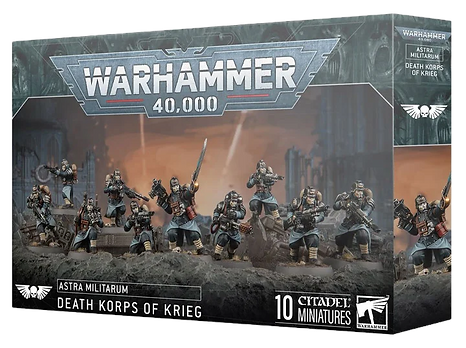
La primera caja la he conseguido en un lugar debajo de un puente con unos primates que lucen igual de tetos que como todo el fandom de esta mier-. el punto es que estos primeros minis que he conseguido aparentemente valen puntos y en base a esos puntos, tu ejercito es mas grande y mas poderoso.... la caja en cuestion es la siguiente:

Ahora bien, como se puede apreciar en pantalla, la
caja contiene 10 minis que entre todos valen 65
puntos segun la data sheet oficial de WH40K.
Se puede jugar una partida pequeña llamada Kill
Team, que es una forma de juego rapida, aunque
para jugar el juego base necesitamos al menos 500
puntos en total para poder comenzar. El objetivo
meta es lograr enfrentarse a un ejercito de 1000
puntos, asi que con esta caja no es suficiente.
Segunda caja - 95
Ahora bien, la segunda caja que he adquirido ha sido la llamada "Equipo de Artilleria", la cual segun la data sheet oficial del juego de WH40K, incluye un solo minis, que es el del equipo de artilleria con los 3 soldados oficiales que vienen en la portada. Al igual que la primera caja, la he conseguido con los primates debajo del puente.

Ahora bien, ya que hemos mencionado el famoso Kill Team de 10 piezas. Como esta pieza no es un soldado y en su lugar es un
vehiculo o armamento o estructura, no se puede jugar Kill Team,
ya que las reglas de ese juego son partidas pequeñas de 40 min
en las que no se puede usar ninguna clase armamento que no
sean los propios hombres. Por cierto, regresando al tema del
puntaje necesario para jugar el juego base, esta caja tiene un
total de 95 puntos de juego, lo cual si lo sumamos con la caja
anterior, tenemos un total de 160 puntos hasta ahora, lo cual con
tan solo dos cajas nos faltan ya solo 340 puntos para comenzar
a jugar de una manera mas profesional.

Tercera Caja - 450
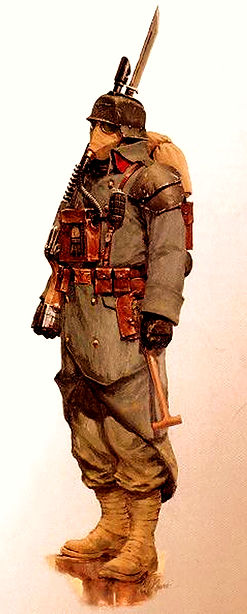
Ahora bien, en esta tercera caja que he adquirido, ha sido definitivamente la pesada, ya que contiene como se puede apreciar en la imagen, 35 minis de estos soldados de trinchera. Ahora lo que ocurre es que la caja esta compuesta de cajas mas pequeñas fusionadas en un mismo paquete. Estas cajas incluyen lo equivalente a:
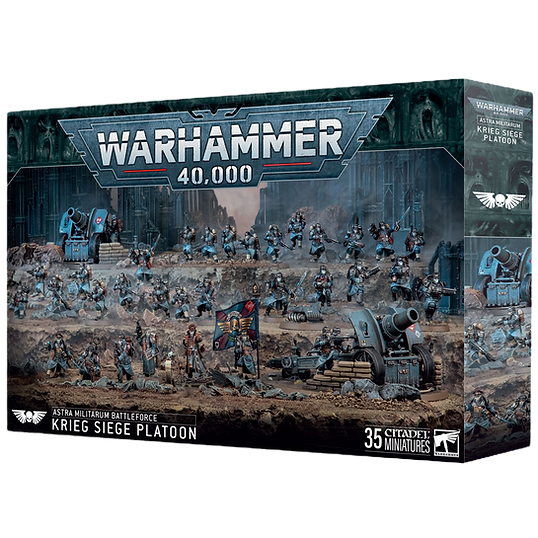
I. 20 Death Korps (lo equivalente a 2 de la primera caja que he adquirido, es decir, 130 puntos en total)
II. 2 Equipos de Artilleria (Los que valen 95 puntos)
III. Un Equipo de Ingenieros (Valen 65 Puntos)
IV. Un Equipo de Comandancia (65 Puntos)
Listo, esto en total sumado por si solo son 450 puntos, y sumado a las anteriores cajas tenemos 610 puntos, lo cual cumple el objetivo. Para referencia, estas son las otras dos cajas en conjunto:


Cuarta Caja - 100
Al final, esta es la ultima caja que llevo hasta el momento, lo cual es la mas valiosa hasta ahora. Pero es la mas valiosa, ya que es un personaje en especifico, ya que el,
por cierto, el juego no solo incluye soldados aleatorios, sino personajes del lore del juego real, que en este caso es el Señor Marshal Dreir. Al ser un personaje especifico, cuenta con 100 puntos lo cual nos coloca en unos firmes 710 puntos en total y ya podemos jugar el juego base incluso sin esta adquisicion. Lo interesante de esto, es que cada faccion tiene sus estilos de juego, y los Krieg son parte una faccion llamada Astra Militarum, la cual su estilo de juego incluye comandancia, vehiculos, comunicacion y ordenes en general de tropa a tropa para poder
coordinarse. Como he dicho, a diferencia de otra faccion como los orcos, estos son mas austeros y mas debiles, lo cual lo hace mas interesante a nivel juego y la estrategia a debe ser mas planificada, a comparacion de los orcos los cuales pueden gozar de lanzarse al objetivo y pelear cuerpo a cuerpo por el amor a la guerra.


Siguientes Adquisiciones Parte I.
Ahora, el objetivo es conseguir esta caja de Patrulla de Combate, primero que nada
para despues lograr enfocarse en los vehiculos que mostrare a continuacion.
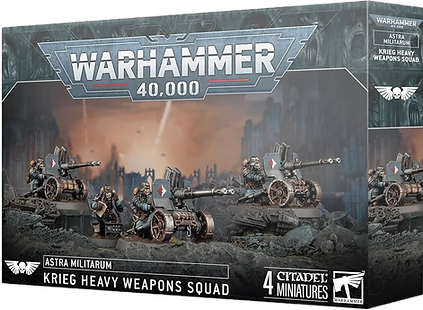
Explicando esta caja.... Contiene un command Squad como el de la Siege Platoon Box, ademas de un Krieg Heavy Weapons Squad, otro equipo de 10 Kriegs y un equipo de 10 Montaraces de la Muerte Krieg, los cuales vienen con sus respectivos caballos como el Señor Marshal Dreir. En total son 265 puntos en total, y si tenemos en cuenta los 710 actuales, ya podriamos decir que tenemos unos 975 solidos puntos para poder pelear contra ejercitos de 1000 puntos. Si le metemos un Tanque de Leman Russ de Herejia de Horus, ya podriamos despegar con 1145 puntos y si alguien de cumpleaños me regalase otro tanque de Leman Russ (Herejia de Horus), ya tendriamos 1315 puntos. Esto es solo especulativo de momento.

Siguientes Adquisiciones Parte Ii.
Ahora, fuera de la combat patrol, o imaginando que ya es nuestra, si conseguimos una de estas por individual y suponiendo que tenemos los los 1315 puntos por dos tanques, ya tendriamos unos 1445 a 1450 puntos en total, lo cual nos logra acercar a un objetivo final.

x2
x3
Siguientes Adquisiciones Parte Iii.
Ya hemos hablado de lo que tendriamos si tenemos 2 tanques, pero en un mundo mas consumista, podriamos tener un tercero o cuarto incluso, lo que nos pone en 1790 puntos.

x 2
Siguientes Adquisiciones Parte iv.
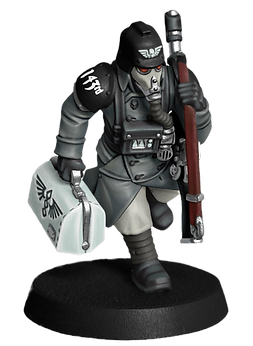
Ahora bien, yo voy a jugar un estilo de juego llamado horda, por lo que voy a necesitar otras unas de estas y para variarle esta que no es de Krieg pero si Astra Militarum, para con las cabezas y partes sobrantes Krieg, Krieg-ificarlos:
x3

Posibles Adquisiciones Parte v.
Y ya teniendo estos dos en un universo de fantasia, nos posicionamos en 1965 puntos.... esto nos deja combatir un ejercito solido de 2000 puntos. Podriamos meterle otro equipo de 10 Kriegs para los 2030 puntos.


Adquieranlo por mi
Si quieren hacerme asi feliz, consiganse cuanlquiera de estas como regalo de cumpleaños o algo asi jaja, nunca pido nada, pero esta es mi wish list....


Krieg esquemas de pintura ideas




Cancelen todo, hice el mio con IA y esta DI-VI-NO. Si pudiera lo subo aca, pero a ver como los pongo aqui.
Krieg esquemas de pintura ideas ii


Krieg esquemas de pintura ideas iiI


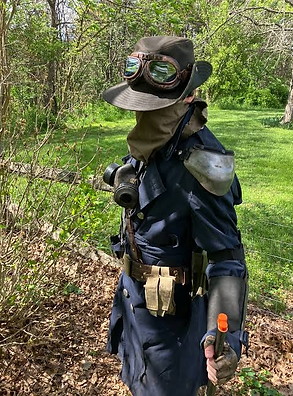
Estos son los esquemas de pinturas que he de usar, ya se tienen las imagenes de las ideas definitivas para hacer a mis Krieg. La idea es que luzcan como los Minuteman que voy a presentar abajo, que son basicamente una faccion de un videojuego que con sede en Estados Unidos con vibes de sus ejercitos, pero con propositos buenos, de ayudar a la gente y asi, y su estetica es bastante genial, dando vibe de insurgentes americanos con acabados interesantes tanto de 1700 como de 1800, son sombreros grandes, trajes cafes y azules, y una bandera que incluso he pensado ponerle como estandarte a mis Krier Minuteman, o Minutekrieg.